
 👀 Choose SSD-powered VPS servers for increased speed, power, and security! Now 50% off- starting from only $3.19/mo.
This article provides a guide demonstrating how to disable two-factor authentication for client area.
How to Disable Two-Factor Authentication for Client Area
If you choose to later disable two-factor authentication, follow the steps below:
- Login to your Hosting Dashboard using your login credentials.
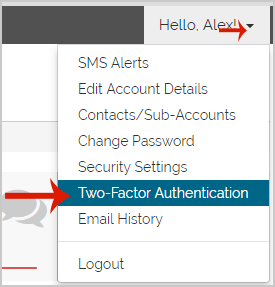
- Under "Hello username", after clicking on it, you will see the "Two-Factor Authentication" option. Click on it.
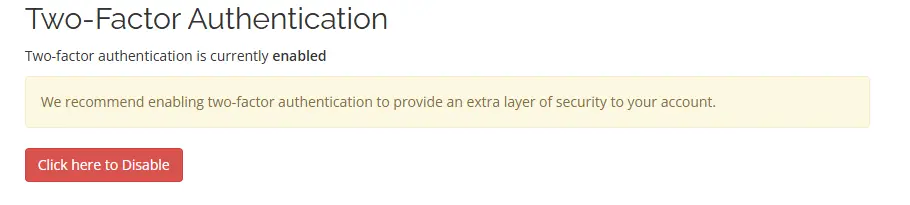
- Scroll down to the Two-Factor Authentication Settings and click the button to disable Two-Factor Authentication:
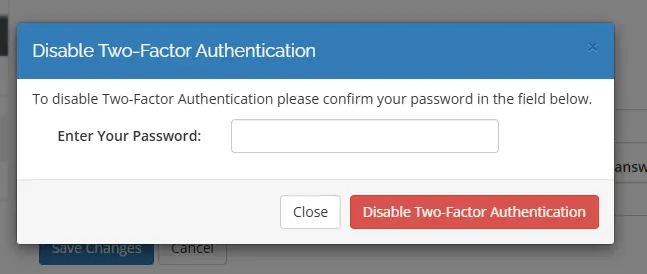
- Follow the prompt to enter your password to confirm disabling the two-factor authentication:
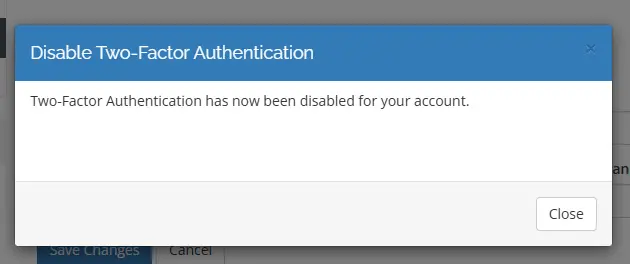
- The two-factor authentication is now disabled and a confirmation is displayed:
Conclusion
You now know how to disable two-factor authentication for client area.